COMMON STEPS:
1. get known of your system ip. for which go to RUN,
type CMD to get in to the command mode.
then TYPE IPCONFIG to get known of your system ip.
2. further open your torrent downloader and note down the port number by doing these steps for bit torrent( mostly the same for most torrent downloaders)
a.open bit torrent. select options, in preference select connections.
where uncheck random port and and select a port number above 60000 ( eg 627141)
then un check nat port mapping..
3. then there is a need to edit some setting inside your modem.
open modem settings by typing 192.168.1.1 in your address bar.
browse for a routing table sort of thing where u can enter the system ip and the port no in bit torrent...
let the starting and ending port no be same as in bit torrent..
u can do it for any no of torrent downloader as utorrents too.
once its done u get a green tick at the lower bar below the speed vs time graph if u have that one showing.
if not go to options in bit torrent and click speed guide which has a speed check and gives a ok for port which is forwarded..
NOTE: different modems have diffferent setting
for clear ideas go to
http://www.portforward.com/english/routers/port_forwarding/routerindex.htm
where u can choose your modem model and get clear steps
Thursday, July 2, 2009


what is portforwarding
There are a couple of concepts you need to know before you can understand port forwarding. I'm going to make a couple broad statements that are almost always true. For simplicity lets assume they are true for now.
1.) Every device on the internet has at least one ip address. The IP address is a number that is used to identify a device. For more information on ip addresses refer to our What is an IP Address page.
2.) Every IP address is divided up into many ports. When one computer sends data to another computer, it sends it from a port on an ip address to a port on an ip address. For more information on ports refer to our What is a Port page.
3.) A port can only be used by one program at a time.
Now that we've got those general concepts out of the way let's talk about NAT. NAT is an acronym for Network Address Translation. NAT takes one ip address and basically breaks it into many ip addresses.
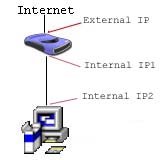
Here the external ip address is broken into two internal ip addresses. The first ip address "IP Address1" is the gateway. While "IP Address2" is the ip address of the first computer. Take note that the router has two ip addresses. It has the external ip address, and an internal ip address which acts as the gateway for every computer on the network.

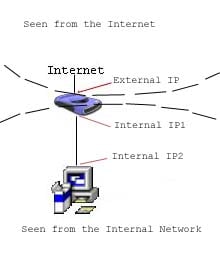
Excuse my rough drawing. Computers on the internal network can only "see" internal ip addresses. So computers on the internal network can not send data directly to a computer outside of the network. When a computer on the network wants to send data to a computer outside of the network, it sends the data to the gateway. Remember the gateway is the internal ip address of the router. The router then takes this data and sends it out to the computer on the internet. The router sends the data out of the external ip address. The same thing is true of computers on the internet. A computer outside of the network can not "see" a computer inside of the network. They can only "see" and send data to the external ip address of the router. The router must then decide what to do with this data. Lucky for us NAT takes care of most of the work for us. There are some programs that NAT was not designed to work with, those are the programs we need to set up port forwarding for. Okay take a deep breath! We are on to port forwarding.
Now that you understand the general concepts of a network, explaining port forwarding is easy. When a computer on the internet sends data to the external ip address of the router, the router needs to know what to do with the data. Port Forwarding simply tells the router which computer on the local area network to send the data to. When you have port forwarding rules set up, your router takes the data off of the external ip address:port number and sends that data to an internal ip address:port number. Port Forwarding rules are created per port. So a rule set up for port 53 will only work for port 53.
A port can only be used by one program at a time! Think of how this rule interacts with NAT. Well you've only got one external ip address on your router. When computer 1 is using port 500, it is using port 500 on it's internal ip address. If you have set up a port forwarding rule for computer 1 and port 500, the external ip address's port 500 is also in use. This means that you can only use port 500 on one computer on the network at a time. Using port 500 on two computers at the same time would violate the one program rule, and your data would get messed up. Most routers require you to specify an internal ip address to forward ports to, just for this reason. Some do not, so be aware of this. Port Forwarding rules will only work for one computer at a time!
PROBLEMS U MAY ENCOUNTER
Warnings
- Downloading torrents can slow your computer down depending on well your computer performs. Recommended specs for each client vary, but on average you should have at least 512 MB of RAM and a 1 GHz CPU. You will also need space for the files you want to save.
- In certain jurisdictions it is illegal to download content through peer to peer networks such as bittorrent. There is a program which blocks certain IP addresses from communicating with your computer and can help protect you while downloading. PeerGuardian can be found at: phoenixlabs.org/pg2or [1]
- Keep your anti-virus program and its definitions fully up-to-date, downloaded software from 'sharing' sources carries a high risk of infection.
- Downloading torrents can slow your overall internet connection down if you don't properly tweak your upload rate. DSL and Cable modems have problems downloading if you're uploading at your maximum rate. Set your clients maximum rate to 80% of your maximum upload rate if you can adjust it. If you set your upload rate too low, your downloads will slow to a crawl.
- It's important to know about bittorrents so that you know the risks, consequences, and best practices.
TIPS IN USING TORRENTS
TIPS TO EASE DOWNLOAD OF TORRENTS
- You can close your torrent program and turn off your computer when you need to. Most torrent programs will resume download process automatically when you start them back up. If the download doesn't resume automatically, there should be an option to start downloading, by either right clicking on the file and choose "Start" or a button somewhere in the program.
- There are other torrent clients (programs) that can be used so do your research on these also. The most popular torrent programs are uTorrent, Azureus and BitTorrent.
- When looking for torrent files, try to find ones with plenty of Seeders. When searching for torrents, you can often sort the results by seeds, simply by clicking on the seeds column header.
- Seeders (Seeds): Are people who have a complete copy of the torrent's files and are only uploading (sending) data to the people who are downloading (peers).
- Leechers (Peers): Are people who have a portion of the torrent's files while they are downloading they are actively uploading to help others download more quickly.
how to download from a torrent
DOWNLOADING YOUR DESIRED CONTENT USING A TORRENT IS SIMPLE. HERE ARE THE STEPS TO GUIDE U.
ALL U NEED IS A TORRENT DOWNLOADING SOFTWARE AND PORTFORWARDING TO SPEED UP THE DOWNLOAD...
STEPS
ALL U NEED IS A TORRENT DOWNLOADING SOFTWARE AND PORTFORWARDING TO SPEED UP THE DOWNLOAD...
STEPS
- Find a torrent program that will suit your needs, the most common clients are uTorrent, Azureus, BitTorrent, or Opera. There are plenty of other clients available as well.
- Follow the instructions on downloading and installing your chosen client.
- Go to a torrent site and search for a file you want to download (Isohunt, Torrentz, Pirate Bay for example). You can however search on Google for many more, just add the word Torrent to your search.
- Once you have found the desired file on the torrent site, click the "Download This Torrent" (or however they word it). Usually, the web browser's file download manager will ask what to do with this file. You want to open the file with your torrent program.
- If it doesn't open that way, just save the .torrent file to an easy to locate place. Then open your torrent client and use the "Open Torrent" feature.
- The download will start automatically. You may now go and do something to pass the time, because torrents do not require your attention and will download in the background.
Monday, June 22, 2009
Saturday, January 12, 2008
torrent downloaders.
once u have got the torrent u are about to down load the the files using some torrent downloading soft wares.they finds the no of ports and the peers that would be useful for the download of the files.but don't forget that u have the work of uploading too.there is no big work to be done just your torrent down loader will take care of that.what all u need is to get a torrent down loader and a torrent good health.
recently growing downloaders.
other than the torrent download we currently have a lot more for downloads.. the main of which is lime wire.which is a fast growing down load engine where u can find file which are pre- uploaded and can download them at high speed.but currently u can get torrents from the above mentioned sites and add them to the latest lime wire for torrent download.and the other one is rapidshare where you should upload a file to down load some thing.but every thing is limited to 100mb for a day.. but u can search for all files at high speed.
down load-lime wire
the lime wire 4.16 pro is the the latest.
rapidshare
down load-lime wire
the lime wire 4.16 pro is the the latest.
rapidshare
Saturday, January 5, 2008
how does torrent work
Peer-to-peer File Sharing
Peer-to-peer file sharing is different from traditional file downloading. In peer-to-peer sharing, you use a software program (rather than your Web browser) to locate computers that have the file you want. Because these are ordinary computers like yours, as opposed to servers, they are called peers. The process works like this:- You run peer-to-peer file-sharing software (for example, a Gnutella program) on your computer and send out a request for the file you want to download.
- To locate the file, the software queries other computers that are connected to the Internet and running the file-sharing software.
- When the software finds a computer that has the file you want on its hard drive, the download begins.
- Others using the file-sharing software can obtain files they want from your computer's hard drive
what are torrents
Torrent is a peer-to-peer file sharing (P2P) communications protocol. BitTorrent is a method of distributing large amounts of data widely without the original distributor incurring the entire costs of hardware, hosting and bandwidth resources. Instead, when data is distributed using the BitTorrent protocol, each recipient supplies pieces of the data to newer recipients, reducing the cost and burden on any given individual source, providing redundancy against system problems, and reducing dependence on the original distributor.
The protocol is the brainchild of programmer Bram Cohen, who designed it in April 2001 and released a first implementation on 2 July 2001.[1] It is now maintained by Cohen's company BitTorrent, Inc.
Usage of the protocol accounts for significant traffic on the Internet, but the precise amount has proven difficult to measure.
There are numerous compatible BitTorrent clients, written in a variety of programming languages, and running on a variety of computing platforms.
Subscribe to:
Posts (Atom)